Imagine the buzz: Shakira drops ‘ZOO,’ the fiery theme song for the long-awaited ‘Zootopia 2,’ and within what feels like minutes, it’s absolutely everywhere on Chinese social media. The hype is real, and the numbers are staggering. But for countless overseas Chinese and international fans, there’s a frustrating wall between them and this musical phenomenon. While mainland China celebrates, many are left staring at dreaded error messages: ‘This content is not available in your region.’
If that’s you, staring at a buffering screen or an access-denied page, you’re not alone. Let’s talk about what you’re missing and why this track has become an unstoppable force.
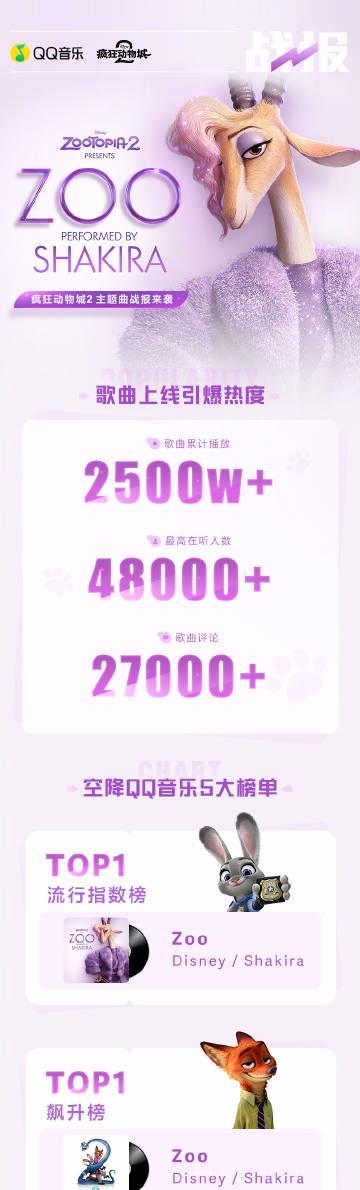
The official #QQMusicBattleReport tells a story of pure domination. Shakira’s ‘ZOO’ isn’t just popular; it’s a cultural event. The song has blasted past 25 million streams. Think about that number for a second. Even more impressively, at its peak, over 48,000 people were listening simultaneously—a virtual stadium singing along in real-time. The comment section exploded with 27,000+ messages, fans dissecting every beat and lyric tied to the new ‘Zootopia’ adventures.
It didn’t just perform well; it conquered. ‘ZOO’ executed a perfect chart invasion, landing at the #1 spot on five major QQ Music charts: Popular Index, Soaring Chart, Western Music, Movie/TV Soundtracks, and #2 on the Hot Songs chart. It has racked up a cumulative 68 appearances on these top lists. This isn’t a song; it’s a takeover.
But the frenzy goes beyond just listening. QQ Music launched special ‘Zootopia 2’ character badges and profile skins, and fans went wild. Over 200,000 users have already snapped up these digital collectibles to show their allegiance. The official post practically screams with excitement: ‘Click to listen to 《ZOO》! Badges and skins waiting for you!’ For those in the region, it’s an immersive party. For those outside, it’s a glimpse into a party they can’t quite reach.
This scenario is painfully familiar, isn’t it? Whether it’s the latest chart-topping movie on iQIYI, a viral variety show on Tencent Video, or a smash hit like ‘ZOO’ on QQ Music, geo-blocks are the uninvited guest for the global Chinese diaspora. The excitement is palpable online, in group chats, and on Weibo, but when you click the link… nothing. Just silence, or worse, endless buffering.
It creates a weird FOMO (Fear Of Missing Out). You see the screenshots of the charts, the friends back home sharing their new ‘Zootopia’ profile theme, the memes from the movie you can’t watch yet, and you feel disconnected. That shared cultural moment, that water-cooler talk about ‘What did you think of that new Shakira song?’—it happens without you. The digital world has made us closer, but these regional walls can make the distance feel greater than ever.
So, what’s the solution? How do you bridge this gap and get from ‘content unavailable’ to joining the 48,000 people jamming to ‘ZOO’ in real-time? The good news is, you’re not powerless. While we won’t dive into a technical tutorial here (that’s for another post!), the key lies in understanding how to navigate these digital borders safely and reliably. It’s about reclaiming your access to the music, shows, and movies that are part of your cultural fabric.
Shakira’s ‘ZOO’ is more than a song; it’s a testament to how a global superstar can ignite a localized firestorm. Its record-breaking success on QQ Music is a case study in viral marketing and fan engagement. But it also highlights a modern dilemma. In an era where art and entertainment are global, why should your location dictate your playlist?
The next time you see a battle report like this—whether for a song, a drama, or a movie—remember that the excitement doesn’t have to be exclusive. The conversation doesn’t have to happen without you. Have you faced this ‘geo-block frustration’? What’s the one show or song you wish you could access right now from abroad? Share your story below—let’s talk about the content walls we’re all trying to break down.
How to Use Sixfast: A Quick Start Guide

Sixfast is a lightweight acceleration tool designed to optimize your internet connection for gaming, streaming, and other online activities. Here’s how to get started:
1. Download and Install
Visit the official Sixfast website and download the client for your device (Windows, macOS, Android, or iOS). Follow the instructions to install.
2. Sign Up and Log In
Open the app and register with your email or phone number. You can also log in using WeChat, Apple ID, or other supported platforms.
3. Redeem Free Membership with Code “666”
After logging in, go to the “Profile” or “Account” section and look for “Redeem Code” or “Gift Code.” Enter 666 to receive free VIP membership time—perfect for trying out premium acceleration features.
PC:

mobile:

4. Select a Game or App
Choose the game or application you want to speed up. Sixfast supports popular titles like Genshin Impact, PUBG, Honor of Kings, and more.
5. Choose Region and Start Acceleration
Sixfast will automatically recommend the best server based on your location, or you can manually select one. Tap “Start” to begin acceleration.
6. Enjoy Low Latency
Once connected, launch your game or app and enjoy smoother, faster performance with reduced ping and lag.
Try Sixfast today and level up your online experience!