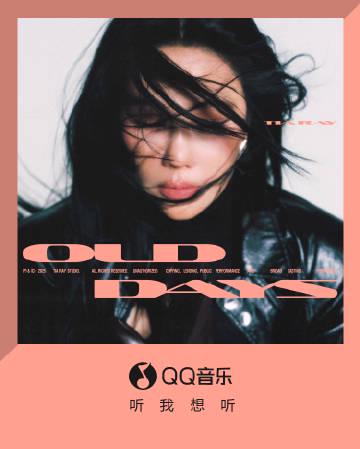
I was scrolling through my Weibo feed, half-asleep with a cup of lukewarm coffee in hand, when the notification popped up. TIA Yuan Yawei had just dropped a new single, ‘OLD DAYS’. The preview snippet auto-played—a few seconds of that signature smoky, languid voice wrapped around a flute melody that felt like sepia-toned film grain. I immediately reached for my headphones.
You know that feeling? When a song’s description talks about ‘melting the boundaries of time and space’ and you just need to hear the whole thing? That was me. I clicked the link to QQ Music faster than you can say ‘nostalgia’.
And then it happened. The spinning wheel of doom. A cold, robotic error message in English where the music video should have been. ‘This content is not available in your region.’
My coffee suddenly tasted more bitter. I was sitting in my apartment overseas, eight thousand kilometers from home, and that digital wall hit me all over again. It wasn’t just about missing a new song; it was that disconnect, that ‘you-are-here-but-you-can’t-touch-this’ reminder. The promo post described the song as a ‘gift from time,’ but for us abroad, sometimes time’s gift comes with a ‘delivery restricted’ tag.
I remember the specific, almost silly frustration. I could see the gorgeous album art—TIA looking like a vintage movie star—and read every poetic line about ‘old light halos’ and ‘unreturnable moments.’ My friends back in China were probably already sharing their ‘专属回忆’ (exclusive memories) linked to the song in the comments. Meanwhile, I was stuck refreshing the page, hoping the buffering would magically stop, feeling oddly left out of a collective moment.
It’s these small things. It’s not just a song or a TV show episode. It’s the shared cultural pulse you suddenly can’t feel. The Weibo hashtag #袁娅维新歌OLDDAYS# was trending, buzzing with reactions, and I was on the outside, nose pressed against the glass.
So I did what any reasonable, frustrated person would do. I messaged my little sister back in Shanghai. ‘Hey, can you screen record the full MV and send it to me?’
Her reply came with a laughing-crying emoji: ‘Again? Sis, you need a permanent fix. This is the third time this month!’ She was right. Last week it was a variety show, the week before that, a new historical drama everyone was dissecting. This geo-blocking is a recurring character in the story of our lives abroad.
She sent over a grainy, audio-slightly-out-of-sync screen recording. And you know what? Even through that compromised format, TIA’s voice did its magic. That blend of ‘Eastern aesthetic and R&B’ they talked about? It came through. It felt like a whispered secret passed hand-to-hand, a bit broken but still precious.
This whole little saga—from anticipation to error message to grainy video—took maybe 15 minutes. But it’s a 15-minute ritual so many of us know by heart. That sigh when the buffer icon appears. The frantic search for workarounds. The slight melancholy of experiencing a piece of home second-hand, slightly distorted.
TIA’s song is about memories shaping our present. And my present, in that moment, was shaped by a spinning loading icon and a deep, familiar itch to just connect seamlessly. To be part of the conversation in real-time, not on a delay.
So, to everyone who saw the news about ‘OLD DAYS,’ got excited, clicked, and then got the block—I see you. That shared sigh of frustration? Consider this a virtual nod. We’ll find a way to listen. The music, and the connection it represents, is worth the extra step.
How to Use Sixfast: A Quick Start Guide

Sixfast is a lightweight acceleration tool designed to optimize your internet connection for gaming, streaming, and other online activities. Here’s how to get started:
1. Download and Install
Visit the official Sixfast website and download the client for your device (Windows, macOS, Android, or iOS). Follow the instructions to install.
2. Sign Up and Log In
Open the app and register with your email or phone number. You can also log in using WeChat, Apple ID, or other supported platforms.
3. Redeem Free Membership with Code “666”
After logging in, go to the “Profile” or “Account” section and look for “Redeem Code” or “Gift Code.” Enter 666 to receive free VIP membership time—perfect for trying out premium acceleration features.
PC:

mobile:

4. Select a Game or App
Choose the game or application you want to speed up. Sixfast supports popular titles like Genshin Impact, PUBG, Honor of Kings, and more.
5. Choose Region and Start Acceleration
Sixfast will automatically recommend the best server based on your location, or you can manually select one. Tap “Start” to begin acceleration.
6. Enjoy Low Latency
Once connected, launch your game or app and enjoy smoother, faster performance with reduced ping and lag.
Try Sixfast today and level up your online experience!